Multifaceted AI photo editor for playful face transformations
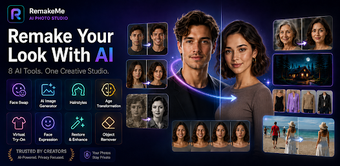
Face Swap Ai Edit: RemakeMe, from Sarana Creative Studio, is an Android app built for creative face transformations and quick portrait edits. The tool uses AI to swap faces, generate images from text, and apply age or style changes so you can rework portraits and group photos rapidly. It emphasizes natural blending and multi-face detection, with one-tap sharing to gallery or social platforms. You, as a social creator or photography enthusiast, get fast, playful results without technical setup.

Unlock your creativity with Adobe Stock
Get 10 images or 1 video with a free trial
Can it handle group photos and multiple faces naturally?
The app includes a Multi-Face Swap mode designed to detect and replace several faces within a single image, which targets event shots and group portraits. Natural blending is highlighted, so swapped faces match skin tones and expressions rather than appearing pasted. That combination makes the tool suited to social shots where you want believable swaps across more than one person, rather than single-subject novelty images.
How does the workflow fit a social posting routine?
You get a simplified workflow that minimizes setup, matching the stated "no-skill required" approach. The app offers an AI image generator for quick text-to-image creations and provides one-tap options to save to your gallery or share directly to social platforms. These steps are arranged to move you from idea to shareable output quickly, which suits short editing sessions and iterative social posting.
How reliable are edits, restorations, and object removal?
The tool bundles focused repair and cleanup features, including a Photo Restore mode for faded or blurry pictures and an AI Remover to delete unwanted elements. The developer emphasizes realistic face blending and restoration results, and the Play Store reception notes positive responses to those outputs. For casual restoration and cleanup tasks you can expect usable results suited to everyday memories and social images.
Is the app better for beginners or experienced creators?
The app favors accessibility over manual precision: it offers hairstyle and fashion previews, age transformation, and expression adjustments, all presented as quick actions. It is optimized for modern Android releases, including Android 13 and above, so you need a current device for the smoothest experience. You benefit most if you prioritize fast, AI-driven edits rather than fine-grained, layer-based control typical of desktop editors.
A practical gateway for creators seeking fast, playful transformations
If you want an approachable tool to remake portraits and generate social-ready visuals, the app is a capable entry point that gets you creative results quickly. Its simplified, AI-first workflow trades granular manual controls for speed and accessibility, so you should choose it when you value rapid, believable edits on a modern Android device rather than deep, frame-by-frame control.